Brekz CMS - Prestashop content migration edge cases
When content is migrated from Prestashop (plain HTML stored in the database) to the new Statamic/ProseMirror-based system, most content converts correctly using the automatic import. However, certain HTML patterns are either unsupported, structurally changed, or rendered differently after migration.
This page documents those cases so they can be detected and corrected.
How the migration pipeline works
When migrating Prestashop content to Statamic, under the hood it will convert HTML to Prosemirror, which is the format that Statamic expects.
Prosemirror can later on be converted back into HTML for use with a webbrowser.
Wait, if we are later on converting it back, then what's the point?
This might sounds like a waste by converting it into something and then converting it back, but this has some added benefits.
The main one is that Prosemirror defines what the content actually is, instead of describing how it should look for a specific platform.
This makes the content platform independent and forces us to properly describe the content, instead of writing hacks for specific platforms.
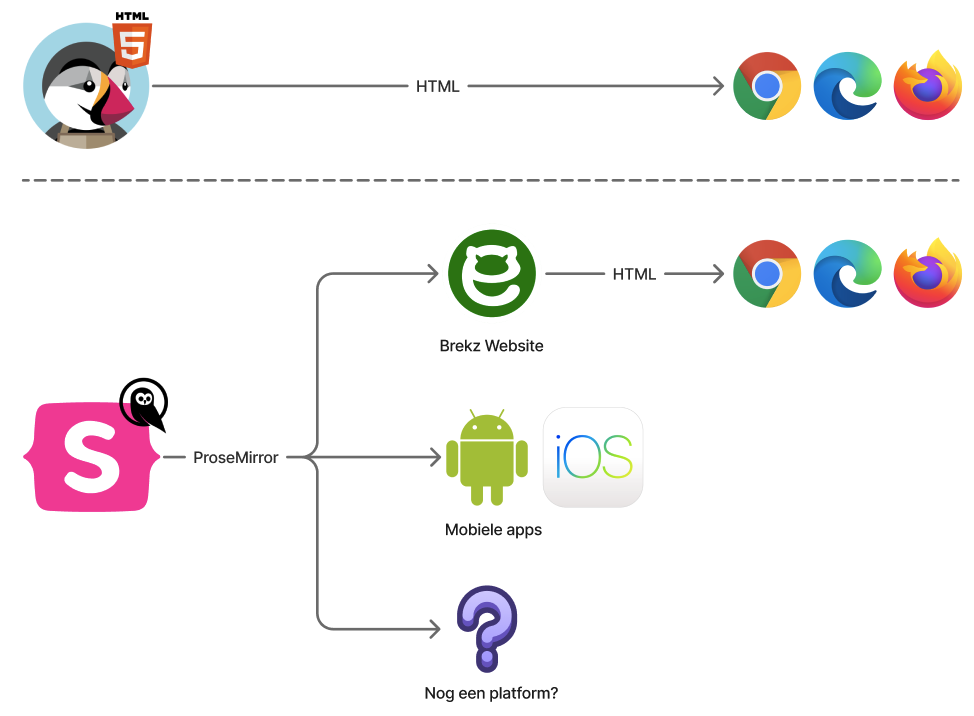
From the perspective of the client (customer visting the website), 2 convertions have taken place.
- HTML → ProseMirror (
HtmlToProsemirrorActioninbrekz-cms) — parses the old HTML and converts it to a ProseMirror node tree stored in Statamic. - ProseMirror → HTML (Blade templates in
brekz-website) — renders the ProseMirror tree to HTML at pre-render time, so a web browser can show it.
Issues can originate in either step, but the HTML → ProseMirror is the most fragile.
This is because HTML has a lot of freedom and also allows you to write hacks specifically for the browser, that won't work on other platforms. Because of this freedom that was given, over the years a lot of those hacks have been stacked instead of properly describing the content using semantic HTML. This makes it very difficult to "detect" what the content is and migrate it over to a more structured format.
ProseMirror → HTML is a lot less fragile, since it's a more hard defined structure, allowing for less edge cases and blocking certain hacks that HTML does allow.
Known edge cases
HTML → ProseMirror
Multiple consecutive spaces are deleted
The converter strips sequences of two or more whitespace characters entirely (replacing them with an empty string, not a single space).
| Old HTML | Result |
|---|---|
price: €9.99 |
price:€9.99 |
hello world |
helloworld |
How to detect: Look for words that appear incorrectly joined in rendered output, particularly in price displays or copy that used double-spacing for alignment.
Ordered lists (<ol>) become plain paragraphs
Might be fixed in the future
If desired we can probably implement this, but we haven't seen a case yet where this happens.
The converter has no handler for <ol>. It falls through to the default case, which wraps the children in a paragraph node. All numbering and list structure is lost.
| Old HTML | Result |
|---|---|
<ol><li>Step 1</li><li>Step 2</li></ol> |
Two plain paragraphs: "Step 1", "Step 2" |
How to detect: Numbered lists in the old content that now appear as flat paragraphs without numbers.
Inline marks wrapping mixed content become a paragraph
Workaround
We haven't seen this exact case happen before, but could happen in theory.
It's still possible to to this, you just have to invert it. The Statamic editor should automatically do this for you if you recreate the paragraph and styling manually.
When a formatting tag (<strong>, <em>, <i>, <b>) wraps more than one child node (e.g. text mixed with another tag), the converter's applyMark() cannot apply the mark to multiple nodes. Instead it wraps all children in a new paragraph node, and the outer mark is lost.
| Old HTML | Result |
|---|---|
<strong>word <em>italic</em> more</strong> |
A plain paragraph containing "word italic more" — no bold |
<em>text <span>span</span> text</em> |
A plain paragraph — no italic |
How to detect: Bold or italic sections that contained any inner formatting and now appear without the outer style.
Links wrapping mixed content lose their href
Workaround
We haven't seen this exact case happen before, but could happen in theory.
Links that are styled are still possible, you just have to invert it. The Statamic editor should automatically do this for you if you recreate the link and styling manually.
Same root cause as the case above. When an <a> tag wraps more than a single plain text node, applyMark() wraps the children in a paragraph instead of applying the link mark. The href is completely lost.
| Old HTML | Result |
|---|---|
<a href="/dogs">Shop <strong>dogs</strong></a> |
A plain paragraph: "Shop dogs" — no link |
<a href="/sale">Big <em>sale</em></a> |
A plain paragraph — no link |
A link wrapping a single plain text node is not affected: <a href="/dogs">Shop dogs</a> converts correctly.
How to detect: Links that contained any bold/italic/span child elements and now appear as plain (unlinked) text.
CSS styling and scripts are not supported
All forms of CSS styling and JavaScript are dropped by the converter:
<style>tags are dropped because inline stylesheets are unlikely to work correctly in the new system, since the entire front-end has been rebuilt from scratch.<script>tags are dropped for security reasons. There is no valid use case for loading JavaScript through CMS content.class="..."attributes are dropped because these styling classes most likely don't exist anymore, since the entire front-end has been rebuilt from scratch.style="..."attributes on any element are silently ignored. The converter only reads a fixed set of known attributes (href,src,alt,colspan,rowspan, etc.) and does not forward arbitrary HTML attributes.
| Old HTML | Result |
|---|---|
<style>.red { color: red }</style> |
Dropped entirely |
<script>alert('hi')</script> |
Dropped entirely |
<p style="color: red">text</p> |
<p>text</p> — style attribute lost |
<span style="font-weight: bold">text</span> |
<span>text</span> — use <strong> instead |
<span class="highlight">text</span> |
<span>text</span> — class attribute lost |
How to detect: Any visual styling that relied on inline CSS or CSS classes will be gone.
Pages that embedded <script> tags for tracking or widgets will need those replaced with a proper implementation or CMS component.
Unknown or unsupported HTML tags become paragraphs
Any tag not explicitly handled by the converter (<div>, <blockquote>, <section>, <figure>, <aside>, etc.) falls through to the default case and becomes a paragraph node wrapping its children.
A lot of the time this is a somewhat safe assumption, but can also break some more heavily styled elements.
Cases like a <div> being used like a <table> with a lot of custom CSS, will no longer work and should be replaced with a proper table.
How to detect: Complex layouts using <div> wrappers or semantic HTML elements will be flattened into sequences of paragraphs.
Visually inspect any page that used structural HTML beyond <p>, <ul>/<li>, <h1>–<h6>, <strong>, <em>, <a>, <br>, and <span>.
If the importer is run via a console and HTML_TO_PROSEMIRROR_SHOW_WARNINGS is enabled, it will also output warning when it sees a tag it doesn't understand.
This can help with discovering potentially broken pages.
ProseMirror → HTML
Formatting marks inside headings are dropped
Might be fixed in the future
We haven't seen this case happen before, but could happen in theory.
If it happens quite often, we can consider implementing this.
heading.blade.php renders its content items by passing them directly to @load_component, which calls text.blade.php. That template only outputs the raw text value — it does not handle marks (bold, italic, etc.).
| Old HTML | Result |
|---|---|
<h2><strong>Bold heading</strong></h2> |
<h2>Bold heading</h2> |
<h3>Intro to <em>cats</em></h3> |
<h3>Intro to cats</h3> |
The text is preserved but the formatting is silently stripped.
How to detect: Headings that should contain bold or italic text but appear as plain text.
Images may render as broken or as a placeholder
Might be fixed in the future
We are still working to see if we can automate this, but this might not be possible and aren't sure yet at the moment.
The converter does preserve <img> tags, it creates an image node with the src, alt, and title attributes.
However, image.blade.php passes the src value through Statamic's GlideTag resolver, which expects a Statamic-managed asset reference, not a raw external URL.
Old PrestaShop image URLs (e.g. /img/products/cat.jpg or an absolute CDN URL) will not be resolvable by GlideTag and will likely produce a broken or empty src.
| Old HTML | Result |
|---|---|
<img src="/img/cat.jpg" alt="A cat"> |
<img src="" alt="A cat" /> — broken image, alt preserved |
Please note that images are also refused to be served if it's MIME-type (file type fingerprint) isn't in the whitelist. The allowed asset MIME-types are:
| Mime type |
|---|
image/jpeg |
image/jpeg2000 |
image/gif |
image/png |
image/bmp |
image/tiff |
image/tiff; lzw |
image/x-tiff |
image/x-icon |
image/svg+xml |
image/webp |
image/webp; lossy |
How to detect: Images that appear broken (no visual, but the <img> tag is present in the DOM) or placeholder images. Check the rendered src attribute.