brekz-prestashop
The brekz-prestashop service is part of the Brekz platform.
This document describes its purpose, responsibilities, and key information for developers working on or with this service.
Purpose
The purpose of brekz-prestashop is the pure income of the Brekz Group organisation. This is the webshop which the customers will search for products, place orders and check order status in their account.
This service ensures that the income for brekz-group is generated and has the most value of all services as of today. This service connects with all other services either front-facing or back-facing services.
Technical Flows
🔧 Click to view a detailed technical flow
sequenceDiagram
    Customer ->> brekz-prestashop: Update newsletter opt-in
    brekz-prestashop ->> brekz-copernica: Send customer update via API
    brekz-copernica ->> Copernica API: Sync customer profile

    Scheduler ->> brekz-copernica: Trigger background jobs
    brekz-copernica ->> Copernica API: Sync products, orders, carts
Technical Overview
| Type | Technology |
|---|---|
| Language | PHP 7.2 |
| Framework | Prestashop |
| Database | MySQL |
| Queue System | Beanstalkd |
| API Type | not available. |
Cronjobs
🔧 Click to view a detailed Cronjob table
| Executed By Cron | Script | Description | |:-------------------|:----------------------------------------|:--------------------------------------------------------------------| | Every 15 minutes | set_environment_15mins.sh | Performs a scheduled task. | | Every 15 minutes | cron_dpd_15min.sh | Handles DPD shipping or tracking updates. | | Every 2 minutes | cron_docdata_updates-MOVED-TO-WORKER.sh | A scheduled cron task script: cron docdata updates-MOVED-TO-WORKER. | | Every 2 minutes | set_environment_02mins.sh | Performs a scheduled task. | | Every 30 minutes | set_environment_30mins.sh | Performs a scheduled task. | | Every 30 minutes | cron_trustpilotmailing.sh | Handles Trustpilot review syncing or mailing. | | Every 5 minutes | start_products.sh | Performs a scheduled task. | | Every 5 minutes | start_debtors.sh | Performs a scheduled task. | | Every 5 minutes | start_orders.sh | Performs a scheduled task. | | Every 5 minutes | set_environment_05mins.sh | Performs a scheduled task. | | Every 5 minutes | get_database_statistics.sh | Performs a scheduled task. | | Every Sunday | product_update_sale_grade.sh | Updates product information, possibly sale prices or stock. | | Every Sunday | cron_every_sunday.sh | A scheduled cron task script: cron every sunday. | | Every Sunday | set_environment_sunday.sh | Performs a scheduled task. | | Every day | tradetracker.sh | Performs a scheduled task. | | Every day | vergelijk.sh | Performs a scheduled task. | | Every day | sync_customergroups.sh | Performs a data synchronization task. | | Every day | hoofdcategorieen.sh | Performs a scheduled task. | | Every day | clean_expired_images.sh | Performs a scheduled task. | | Every day | google_shopping.sh | Performs a scheduled task. | | Every day | cleanup_promotion_management.sh | Performs a scheduled task. | | Every day | search_reindex_algolia.sh | Performs a data synchronization task. | | Every day | bundelmonitoring.sh | Performs a scheduled task. | | Every day | google_sitemap.sh | Generates or uploads a Google sitemap feed. | | Every day | syncproductreviews.sh | Performs a data synchronization task. | | Every day | send_back_in_stock_mails.sh | Sends emails about products that are back in stock. | | Every day | find_guests_with_empty_secure_tokens.sh | Performs a scheduled task. | | Every day | startreviewprocess.sh | Performs a scheduled task. | | Every day | cron_abandoned_cart.sh | Processes or reminds users about abandoned shopping carts. | | Every day | cron_clear_cache.sh | Clears application cache. | | Every day | cron_wget.sh | A scheduled cron task script: cron wget. | | Every day | cron_dpd_nieuw.sh | Handles DPD shipping or tracking updates. | | Every day | set_environment_daily.sh | Performs a scheduled task. | | Every day | cron_daily.sh | A scheduled cron task script: cron daily. | | Every day | cron_dpd_every_day_full.sh | Handles DPD shipping or tracking updates. | | Every day at 12:00 | set_environment_every_day_at_12_00.sh | Performs a scheduled task. | | Every day at 12:00 | cron_every_day_at_12_00.sh | A scheduled cron task script: cron every day at 12 00. | | Every hour | set_environment_hourly.sh | Performs a scheduled task. | | Every hour | sync_check.sh | Performs a data synchronization task. | | Every hour | process_changes_from_hds.sh | Performs a scheduled task. | | Every hour | process_shipments.sh | Performs a scheduled task. | | Every hour | combinatiecheck.sh | Performs a scheduled task. | | Unknown schedule | cron_every_05_mins.sh | A scheduled cron task script: cron every 05 mins. | | Unknown schedule | cron_every_02_mins.sh | A scheduled cron task script: cron every 02 mins. | | Unknown schedule | cron_every_hour.sh | Performs a data synchronization task. | | Unknown schedule | cron_every_15_mins.sh | A scheduled cron task script: cron every 15 mins. | | Unknown schedule | cron_every_30_mins.sh | A scheduled cron task script: cron every 30 mins. |Feature Dependencies
A/B Testing
brekz-prestashop plays a central role in the A/B test between the existing PrestaShop frontend and the new brekz-website. It is responsible for:
- Setting the
AB_templatingcookie server-side to assign visitors to a test group. - Running JavaScript that rewrites eligible category page links to the
www2.*subdomain when the cookie value isB.
Full documentation
A/B Testing Feature Documentation A/B Testing Configuration (brekz-prestashop section)
Purging the Catalog Page Cache
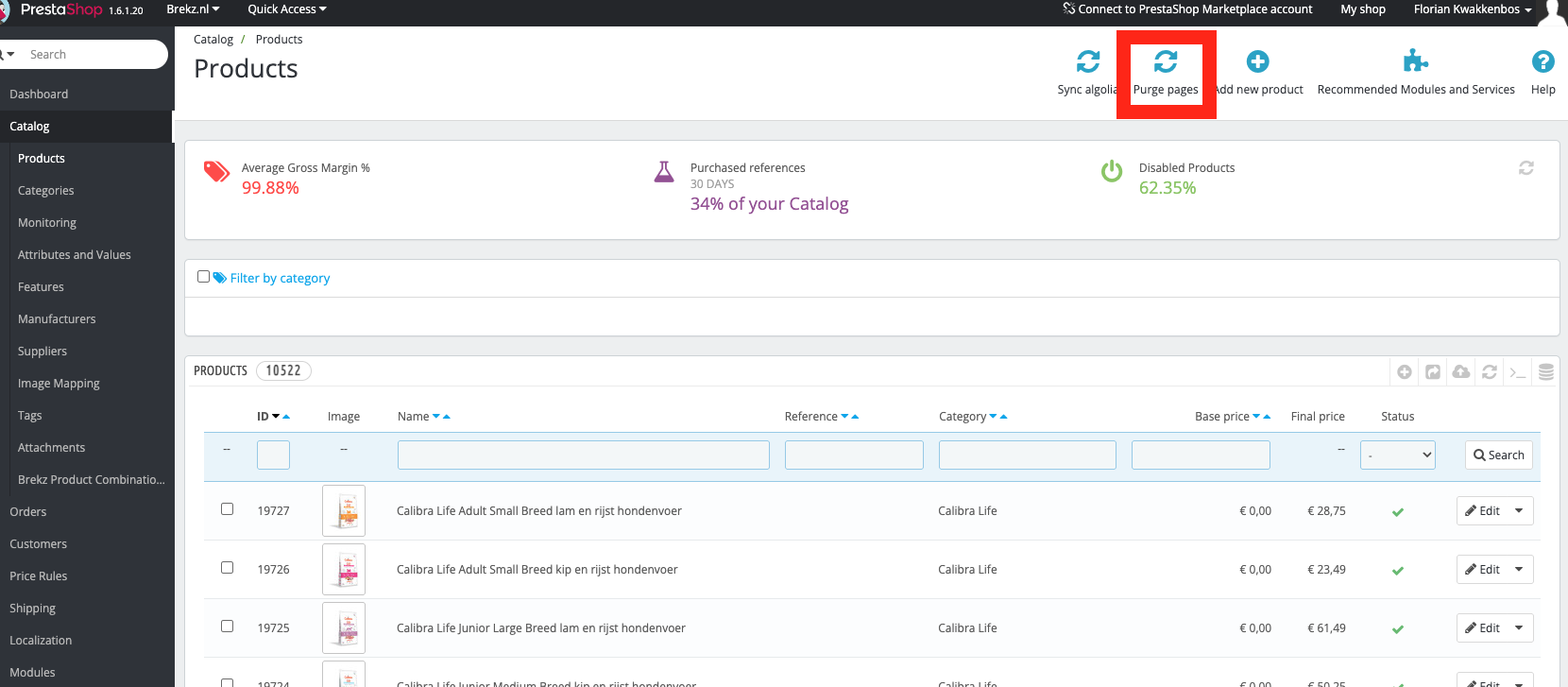
The Products page in the PrestaShop back office (Catalog > Products) has a Purge pages button in the top-right action bar. This button clears the cache for catalog-related pages.
When to use this
Use this after making bulk changes to products or categories that do not seem to be reflected on the storefront, for example after an import, a price update, or a stock synchronization.
To purge the catalog page cache:
- Log in to the PrestaShop back office.
- Navigate to Catalog > Products.
- In the top-right action bar, click Purge pages.
- Wait for the confirmation message indicating the cache has been cleared.
- Refresh the storefront page(s) to confirm the updated content is now visible.
Shop & Language ID Mapping
id_shop and id_lang are the numeric identifiers used across brekz-prestashop — and, by extension, every
other Brekz application — to identify a country/language storefront.
Full mapping
Converting a Product ID to a PDP URL link
When you have a product ID (id_product) from a PrestaShop database query, you can open the Product Detail Page (PDP) directly by constructing the URL as follows:
- Pattern: {BASE_URL}/index.php?controller=product&id_product={id_product}
- Example (local): http://brekznl.localhost/index.php?controller=product&id_product={id_product}
- Example (prod): https://www.brekz.nl/index.php?controller=product&id_product={id_product}
Notes: - Replace {BASE_URL} with the appropriate shop domain for your environment (e.g., production, staging, or local). - Replace {id_product} with the numeric product ID returned by your SQL query (e.g., 12345).